
Customer Portal (Customer-facing Layer)
The Customer Portal provides secure, self-service access to asset lifecycle information and service processes. It empowers customers, operators, and partners to manage assets, requests, and knowledge independently.
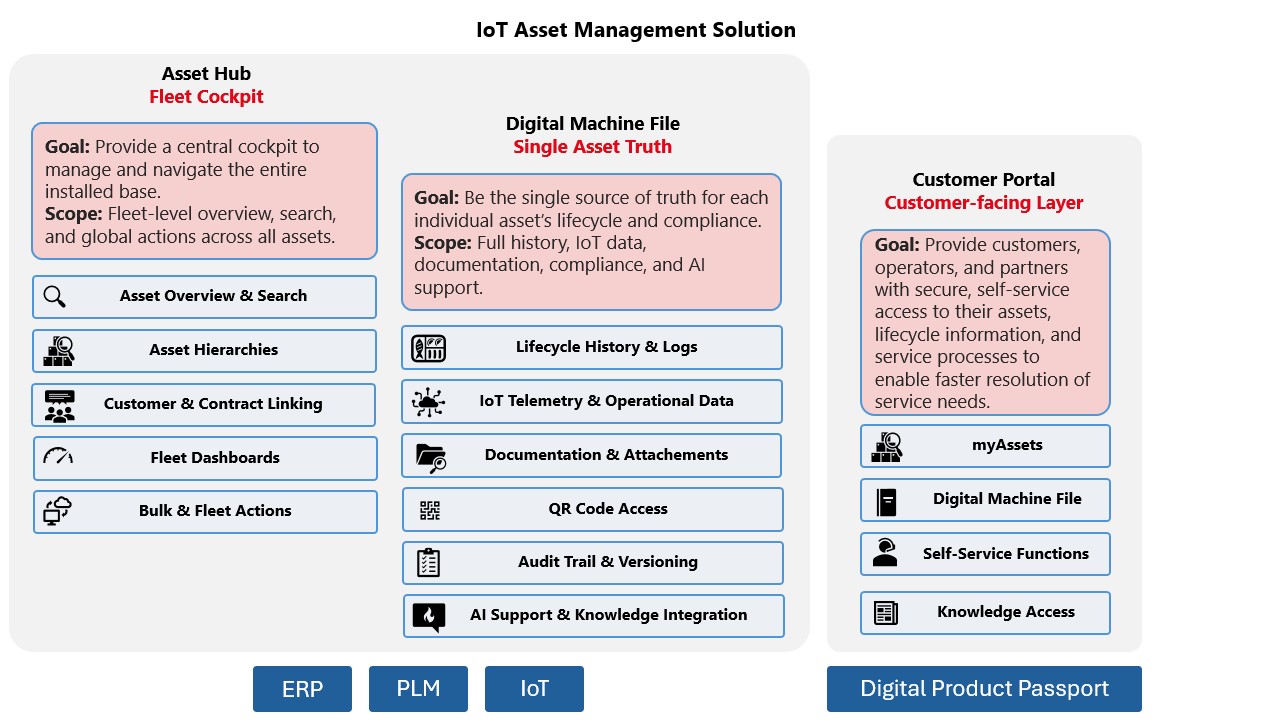
Customer Portal on the right hand side
Asset Overview for Customers
Objective:
Provide customers with a clear, searchable, and interactive asset navigation interface to view current status, filter assets, and inspect details.
Key Capabilities & Benefits:
Tree-Based Navigation Widget
Hierarchical asset view with configurable depth
Customizable columns and fields
Interactive: hover info & clickable nodes
Search & Filter Functions
Search by serial number, location, product type, open cases
Realtime filtering with intuitive UX
Integrated Detail Panel
Clicking an asset opens live data and detail view
Fields shown on hover are customizable
Notifications & Subscription Management
Objective:
Enable customers to subscribe to important notifications such as maintenance schedules and alarms — with personalized delivery.
Key Capabilities & Benefits:
Rule-Based Notification Subscriptions
Define filters for which assets, events, and channels (Email, SMS)
Subscribe to maintenance, alarms, or changes
Overview of subscriptions in personal dashboard
Central Alerts & Maintenance Log
Configurable view of alarms and upcoming maintenance
Filter by asset, type, time range, location
Adjustable visible columns and time frames (e.g., last 7 days)
Digital Lifecycle File for Customers
Objective:
Give customers full transparency over the asset’s lifecycle — including service history, warranties, documents, and change tracking.
Key Capabilities & Benefits:
Case, Task & Order Tracking
View/edit service cases & tasks of an asset or sub-assets
Sortable and filterable views
View past orders for the asset
Document & Contract Management
See, upload, and link documents (manuals, logs, certificates)
View warranties and service contracts
Asset-Level Editing & History
Change asset fields (name, location, status)
Track history of field changes
Add/edit maintenance schedules and forms for logs
QR Code Access
Objective:
Make asset information accessible directly from the physical machine, with or without login — and offer interactive help.
Key Capabilities & Benefits:
QR Code Functionality
Scan opens portal link to the exact asset
Logged-in users see full details, rights respected
Anonymous users see limited info + login link
Maintenance Requests & Case Management
Objective:
Allow customers to create and track service cases directly via portal with rich information and guidance.
Key Capabilities & Benefits:
Case Creation Flow
Submit maintenance request with priority, attachments, and notes
See related open cases on asset, location, or account level
Avoid duplicate cases via suggestions
Case Tracking
View case status across asset/account hierarchies
Configurable case list and filtering